
产品介绍及网络组建
Product Brief & Network Setup
  • 智能化生产Intelligent Production
  • 多元化控制界面,压装方式灵活配置。Diversified contral interfaces and flexible configuration of press-fitting methods.
  • 数据追溯Data Traceability
  • 实时上传位移及压力信息,操作系统可兼容MAS系统。Real-time upload of displacement and pressure information,with the operating system compatible with MAS systems.
  • 大容量数据存储Large-Capacity Data Storage
  • 生产数据同步上传,供生产管理单位实时查看。Production data is synchronously uploaded for real-time viewing by production management units.
  • 精度精密High Precision
  • 位移、压力双重监控,包络线提供灵活算法。Dual monitoring of displacement and pressure,with flexible algorithms provided by envelope curves.
  • 自研控制芯片Self-Developed Control Chip
  • 控制系统满足多种使用场景。The control system meets various application scenarios.

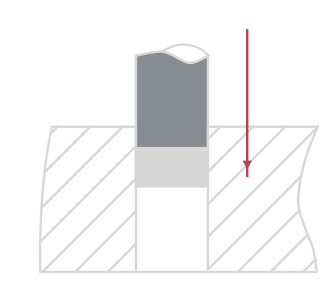
压装示意图
Press-Fitting Schematic Diagram

伺服压机按照设定的参数精确压装,实时监测反馈压装尺寸,保证最终装配精度。同时可以设定压力和位移质量判定区域,在线检测确保产品压装100% 合格。

The servo press performs precise pressing according to theset press-in depth, monitors and feeds back the pressingdimensions in real time to ensure the final assembly accura-cy. Meanwhile, it can set pressure and displacement qualityjudgment zones, and conduct online inspection to guaran-tee 100% qualification of the pressed products.
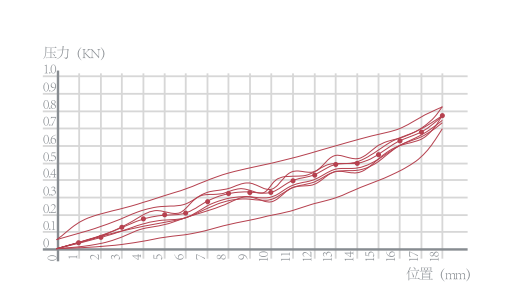
包络线示意图
Envelope Curve Schematic Diagram

自主研发控制系统软件,涵盖运动控制规划、曲线自动采集处理、包络线手动补偿绘制、曲线评估等功能,实现压力及位置分段精确控制。

Independently developed control system software coversfunctions such as motion control planning, automatic curvecollection and processing, manual envelope curve compen-sation and drawing, and curve evaluation, enabling precisesegmented control of pressure and position.

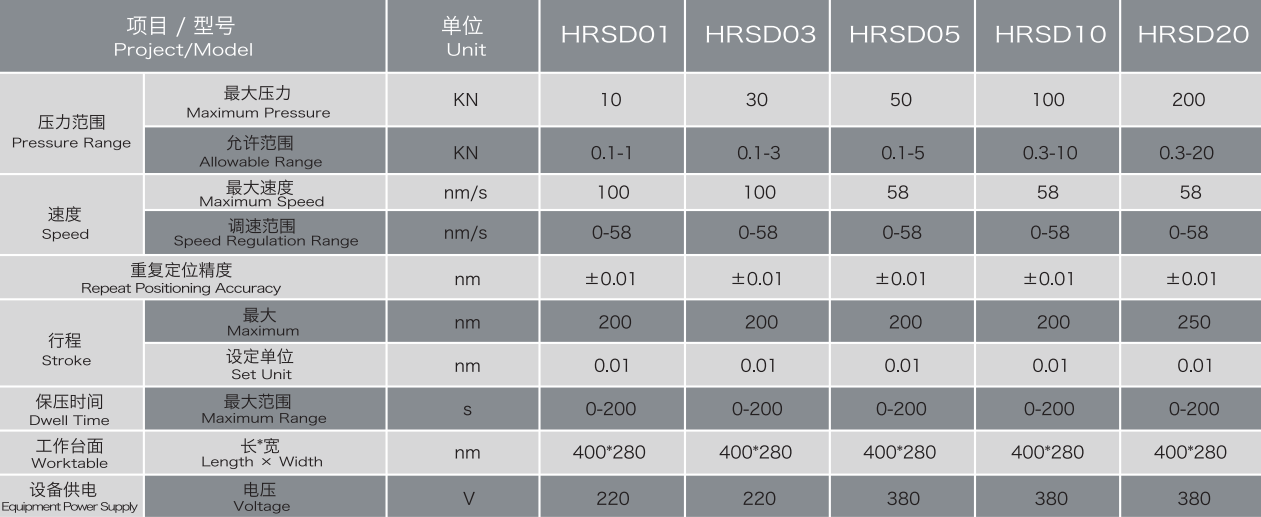
智能伺服压机选型
Intelligent Servo Press Selection
操作系统功能介绍
Introduction to Operating System Functions
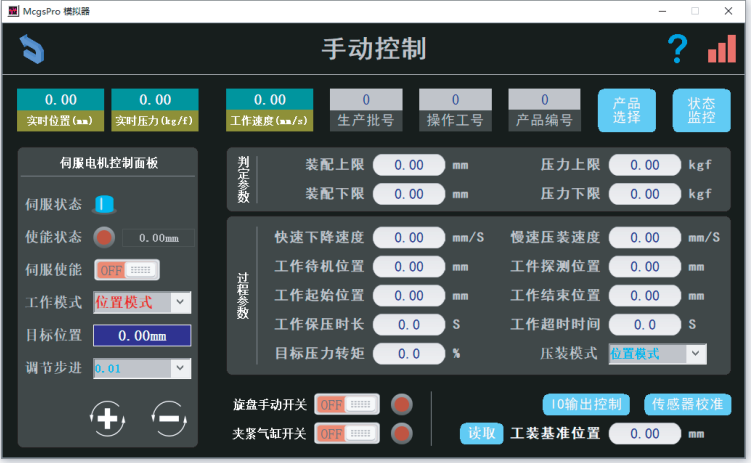
触摸屏手动控制界面

Touch Screen Manual Control Interface

根据使用需求选择设定参数,压装过程实时跟踪压力及位置,开放多用途参数设定模式。

Select and set parameters according to usage requirements, track pressure andposition in real time during the pressing process, and support a multi-purposeparameter setting mode.

判定参数栏说明:
1.装配上限□mm设定基准值;
2.装配下限□mm设定基准值;
3.压力上线上限口Kgf设定基准值;
4.压力上线下限↵Kgf设定基准值;
Explanation of Judgment ParameterColumns:
1.Assembly Upper Limit □mm: Set thereference value;
2.Assembly Lower Limit □mm: Set thereference value;
3.Pressure Upper Line Upper Limit;
Kgf: Set the reference value;4.Pressure Upper Line Lower LimitKgf: Set the reference value;
判定参数栏说明:
1.装配上限□mm设定基准值;
2.装配下限□mm设定基准值;
3.压力上线上限口Kgf设定基准值;
4.压力上线下限↵Kgf设定基准值;
Explanation of Judgment ParameterColumns:
1.Assembly Upper Limit □mm: Set thereference value;
2.Assembly Lower Limit □mm: Set thereference value;
3.Pressure Upper Line Upper Limit;
Kgf: Set the reference value;4.Pressure Upper Line Lower LimitKgf: Set the reference value;
智能伺服压机功能介绍

Function Introduction of Intelligent Servo Press

触摸屏主界面
1.实时跟踪显示压装信息,判定OK、NG。
2.包络线状态跟踪显示。

Touch Screen Main Interface
1.Real-time track and display pressing information, and judge OK/NG.
2.Envelope curve status tracking and display.

触摸屏主界面
1.跟踪显示设备动态信息。
2.实时跟踪设备工作状态及报警提示。
Touch Screen Main Interface
1.Track and display the dynamic information of the equipment;
2.Real-time track the equipment workingstatus and alarm prompts
触摸屏压力及位移参数设定
1.可以根据产品压装参数自动取样,设定包络线取值。
2.通过手动编辑设定压力位移黄金标准曲线,最终合成一条包络线。
Touch Screen Pressure and Displace-ment Parameter Setting
1.Automatically sample according to theproduct pressing parameters and setthe envelope curve values.
2.Manually edit and set the pressure-dis-placement golden standard curve tofinally synthesize an envelope curve.

扫描二维码分享到微信

在线咨询
联系电话

+86 13122838255